
AA Mail Server - Mapping Server Mode
Mail Mapping Server Mode is a unique feature of AA Mail Server, and it will help you save cost significantly when binding with ISP mail service. Mail mapping server means a mirror of your ISP mail server. Using this mapping mode, your staff can exchange all emails via AA Mail Server, needing not to connect to ISP directly via Internet.
AA Mail Server will exchange all internal emails itself and deliver all external outgoing emails through ISP mail server. Mapping mail server mode is very suitable for those companies that wil not give up ISP mail service but hope to enjoy more mail functions of AA Mail Server and better mail administration.
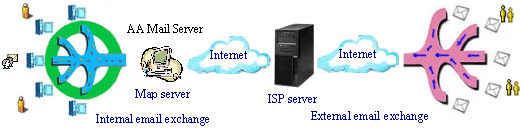
What would happend for mail sending and receiving when in mail mapping server mode? If you send mails to local colleagues, they will receive your mails from address internal@local.com; when you send mails to external Internet customers, they will receive your mails from address external@isp.com! Your internal address will be availalbe and visible locally, and your Internet customers will only know your ISP mailbox address.
1. Your local mailbox is internal@local.com, while external mapping ISP mailbox is external@isp.com;
2. Your local colleagues send mails to you and receive mails from you at local mailbox address: internal@local.com;
3. Your Internet customers send mails to you and receive mails from you at ISP mailbox address: external@isp.com;
Mapping Server Mode - Help You Save Cost
It is very Easy to Try This Mode There are only two steps that you need to make this mode ready: install AA Mail Server locally and then create accounts with their mapping settings. And then AA Mail Server is setup ready for Intranet and Internet email service. You need not to apply for a Internet domain or configure other settings such as domain MX.
Higher Communication Efficiency When using ISP mail service only, internal emails sending is usually very slow because all of they must travel to Internet and then travel back from Internet. With this mail mapping server mode, internal emails will be exchanged locally by AA Mail Server and then you are no more worried about sending 100M mails to colleagues.
Increasing Staff Mailboxes without Cost Increasing It is vey expensive to increase mailbox size for all staff when using ISP mail service. if you using AA Mail Server with mail mapping server mode, you can keep staff mailbox a relative small size for AA Mail Server will auto retrieve down mails on ISP mailboxes incessantly. You can provide each staff with 8G+ mailbox size in AA Mail Server wihtout any cost increasing.
Much More Email Management functions Most ISP mail service functions are usually very limited, e.g. lacking of mailgroup, mail monitoring and other useful functions. With this mode of AA Mail Server, you need not to give up mail service that your ISP provides, and you can enjoy much more functionality that AA Mail Server gives you.
It's very easy to setup AA Mail Server as mail mapping server mode as above said. There are only two steps that you need to make this mode ready: install AA Mail Server locally and then create accounts with their mapping settings. You need not to apply a new Internet domain or change domain MX settings from your ISP.


