
AA Mail Server - UTF8 Webmail Server
The UTF-8 Webmail Server is a major feature of AA Mail Server when compared with other webmail servers. Only when the webmail software supports UTF-8, you can read emails with multi-language in one page without unreadable characters. We hope you will like the webmail server of AA Mail Server. Your suggestion of our webmail server are very welcome.
- Support composing HTML format mail.
- UTF-8 Webmail software supports multi-language.
- Can download original emails via Webmail server.
- Sort emails by status, mail from, subject, mail date and size.
- Provide easy-to-use paging list mode in Webmail.
- Compose new emails without scrolling in webmail software.
- Show html emails without scrolling in webmail software.
- Read/hide message header when read emails in webmail server.
- Register new accounts via webmail server.
- Provide easy-to-use mail search function.
- Can reset password when you have forgotten your password.
- Provide powerful search funtion of email monitoring.
- Move between folders, drop forever emails In webmail software.
- Can display brief mail content in subject line.
- Provide auto signature function in webmail server.
- Provide auto forward function in webmail server.
- Can create and maintain auto filter rules in webmail server.
- Provide anti spam filter rule in webmail server.
- Provide easy to use address book in Webmail server.
- Easily change interface language in Webmail server.
Multi-language UTF-8 Webmail Software
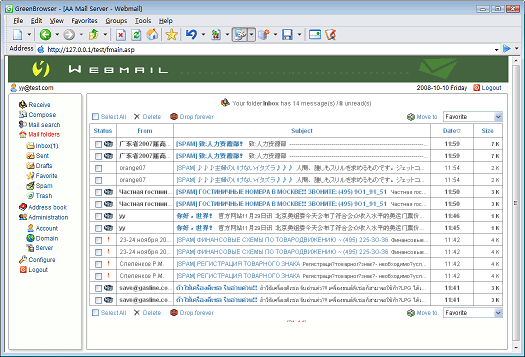
Are you suffered from different language emails with unreadable characters? AA Mail Server Webmail can help you keep away from such problems and provide best web mail based email service for your staff. This web mail software is designed in UTF-8 to support multi literal codes displayed correclty on the same page. Following are an example screenshot. This page has multi-language emails of Japanese, Thai, simplified Chenese and Cyrillic.
Windows IIS is required before running webmail server. You can open "Control Panel -> Add or Remove Programs -> Add or Remove Windows Components" to install IIS component. Always update your Windows operationg system with latest patches. You can use "Settings->Re-install Webmail" to reset Webmail and change virtual name and login mode (with domain list nor not).


